
Textys / Features / The tech pack agent in detail
AI agent that reads the tech pack as a PDF or Excel file and creates the article, bill of materials and sample order
The agent turns a tech pack into a set of Odoo records proposed for review. Each field carries its confidence level, what is missing is flagged, and a confirmed import can be undone.
The process, step by step
- Upload the fileThe tech pack is dropped into the import area, from the imports menu, the sales order or the article. It accepts PDF and Excel files; an import started from an order keeps it as the origin.
- Read in the backgroundAnalysis runs in the background and the import goes from Processing to Review Pending. An unreadable file or a failed analysis leaves the import in Error, with a message, and nothing is created.
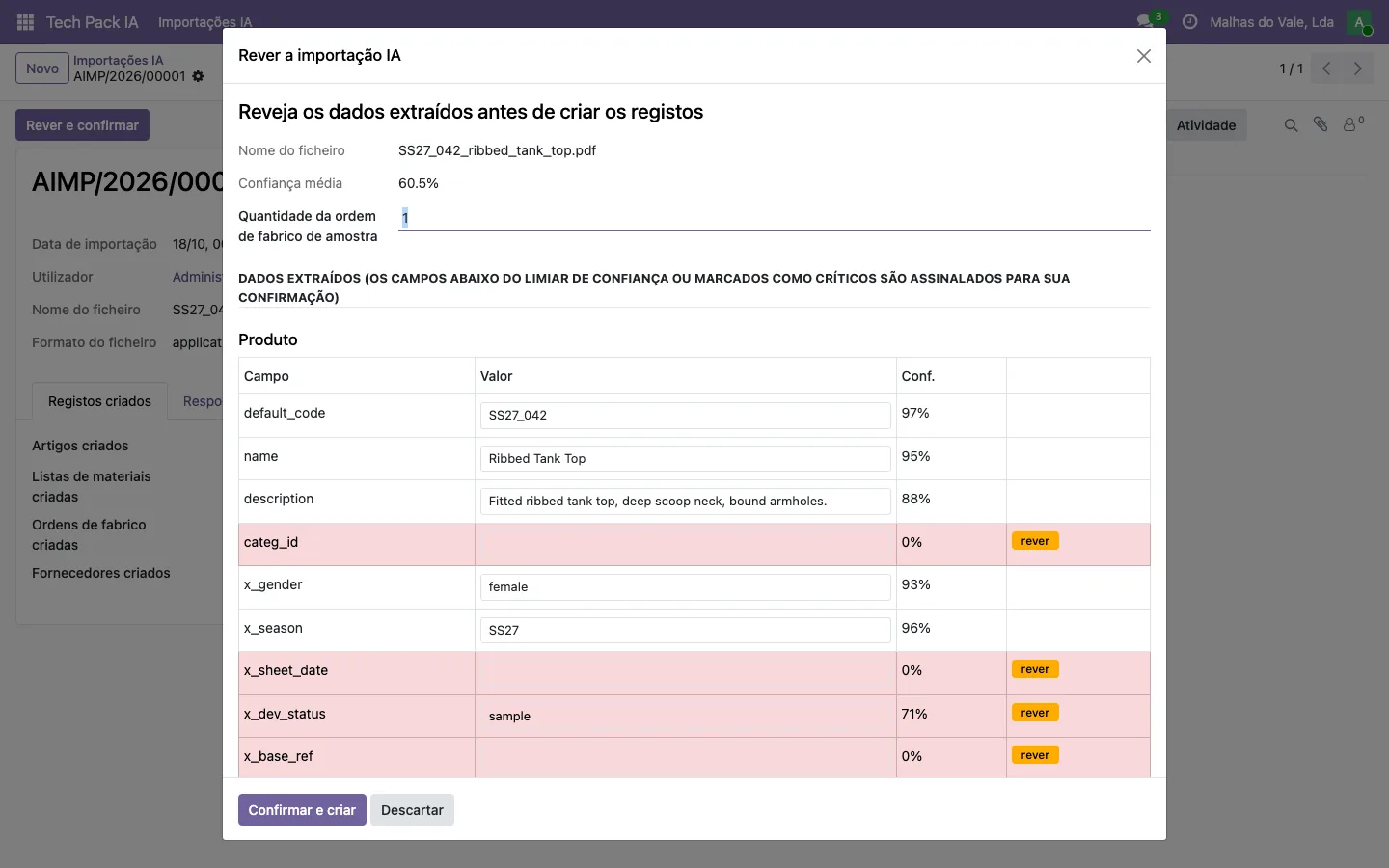
- Review field by fieldThe screen shows each extracted field with its confidence. Fields below the threshold, and those that always need a human eye, turn red with the review label. Each value is corrected on the same screen.
- Handle what is missingA quantity the tech pack does not give is flagged in orange and the line is created with a provisional quantity. So is a component without a supplier. The agent does not invent values and nothing blocks the review.
- Decide the operationsFor each inferred operation, the reviewer decides whether to create it and whether it runs in house, at an existing work centre, or is subcontracted to a factory. Cutting, sewing and packing are suggested from the operation’s name.
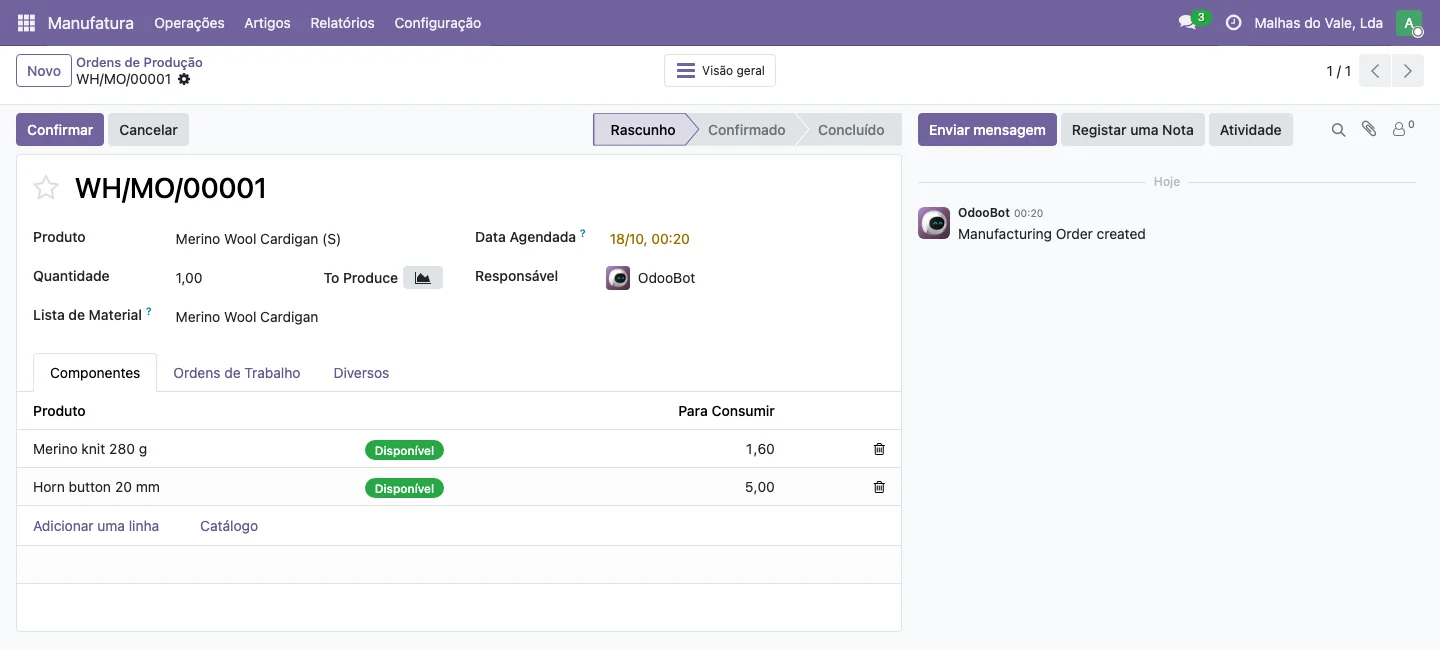
- Confirm and createConfirming creates everything in one transaction: the article, variants, bill of materials, supplier links, routes, operations and the sample manufacturing order, in draft. If anything fails, nothing is created.
- Undo if neededA confirmed import lists the records it created and offers Undo Import to the agent’s and the system’s administrators. Undoing deletes the records created by that import, in the order the dependencies require.
From tech pack to Odoo records
The first lane is the import, with a status at each step. The second is the records that confirmation creates.
processingreview_confirmedproduct.product.mrp.product.mrp.mrp.What the user sees and does
Import list
All imports with their status: processing, review pending, confirmed, cancelled or error.
Review screen
The article fields, the bill of materials lines, variants and operations, with the confidence of each value and the review label.
Confirmed import
The list of articles, bills of materials, orders and suppliers created, the source file and the undo button.
Agent settings
The confidence threshold, the sample order quantity, supplier matching and the keywords of the Manufacture and Buy routes.
The data handled
textys.with status, source file, source order, average confidence and the articles, bills, orders and suppliers created.techpack. import product.extracted: reference, name, description, category, gender, season, sheet date, development status and base reference.template mrp.extracted per material: type (fabric, trim, print or embroidery, label), name, supplier, supplier reference, quantity per piece at base size, unit, colour and placement on the garment.bom. line product.for the sizes and colours on the tech pack, which become variants.template. attribute. line mrp.for the operations inferred, done at an own work centre or by a subcontractor.routing. workcenter product.withsupplierinfo res.partner: the supplier matched by name or created as a draft to validate.
Odoo modules
Community or Enterprise, according to the Odoo edition that ships the module.
| Technical module | Edition | Role |
|---|---|---|
textys_ | Community | The agent: import, review, creation of records and undo. |
textys_ | Community | The Size and Colour attributes, categories and work centres the agent recognises. |
mrp | Community | Bills of materials, operations and the sample manufacturing order. |
purchase | Community | Suppliers and supplier lists per component. |
sale_ | Community | Entry point from the sales order. |
stock | Community | Manufacture and Buy routes assigned to articles and components. |
mail | Community | History and notes on the import. |
Limits and what does not exist yet
- PDF and Excel files only. An Excel file in the old format (.xls) must be saved again in the current format before it is uploaded.
- The agent proposes and the team decides. Accuracy depends on the tech pack: it is measured on real tech packs during the diagnostic, before any commitment.
- The quantity read is that of the base size. Consumption per size is filled in afterwards in the bill of materials, line by line.
- There is one extraction schema, the garment one. Profiles per customer, with their own schema, mappings and languages, are in development and not available yet.
- A supplier that is not recognised is created as a draft, inactive by default, for validation. Internal operations stay on the work centres that already exist.
Frequently asked questions
Does the agent record anything without review?
No. The agent proposes and your team validates on screen. Records are only created on confirmation, and a confirmed import can be undone.
Which files does it accept?
Tech packs as PDF and as Excel files, in the current Excel format.
Which fields always need review?
The supplier and the supplier reference, the quantity and the unit: a wrong supplier leads to a wrong purchase order. Other fields are only flagged below the confidence threshold.
What if the tech pack gives no quantity?
The field is flagged for manual entry and the line is created with a provisional quantity. The agent does not invent values.
How is an import undone?
With the Undo Import button on the confirmed import, reserved to the agent’s and the system’s administrators. It deletes the records that import created.
Does this require Odoo Enterprise?
No. The agent and the modules it depends on are Odoo Community, on Odoo 19 and 20.
Related pages
Bring one of your tech packs and see the review on screen
Book a demonstration Team in Porto, with TSC in Belgium and FranceA TSC product